
Wave
- optical illusion

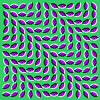
The image appears to ripple or wave. A pick of three random contrasting colors is used for the screen and clam shapes.
To
New
# set default screen, pen and turtle values
ResetAll SetScreenSize [400 400] HideTurtle
SetSC Black SetPC Green SetPS 1 PenUp
End
To
GridSq
:
Order
:
Side
# draw tile at each column x row position
LocalMake "
Offset
(1+
:
Order
)/2
For (List "
Col
1
:
Order
) [
For (List "
Row
1
:
Order
) [
SetXY
:
Side
*(
:
Col
-
:
Offset
)
:
Side
*(
:
Row
-
:
Offset
)
Tile
:
Col
:
Row
:
Side
] ]
End
To
Tile
:
Col
:
Row
:
Side
If (
:
Row
=1) [SetH
:
Col
*30]
Clam
0.8*
:
Side
SetPC
:
Hue
Fill Right 30 Wait 2
End
To
Clam
:
Size
# optical clam shape drawn from centre (tp)
SetPC White Back
:
Size
/3
Arch
112 0.6*
:
Size
Forward
:
Size
/3 Left 180
SetPC Black Back
:
Size
/3
Arch
112 0.6*
:
Size
Forward
:
Size
/3 Left 180
End
To
Arch
:
Angle
:
Radius
# symmetrical arc drawn relative to turtle heading
Arc
:
Radius
Heading-
:
Angle
/2 Heading+
:
Angle
/2
End
To
Go
:
Order
New
SetPW 3
SetSC Pick [ [102 204 51] [51 204 102] [204 204 0] ]
GlobalMake "
Hue
Pick [ [153 102 0] [128 0 255] [0 128 255] ]
GridSq
:
Order
384/
:
Order
End
 Main Command:
Go 10
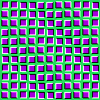
Or with squares. Copy and paste into XLogo the following two procedures. Rename 'TileSq'' as 'Tile'.
To
TileSq
:
Col
:
Row
:
Side
SetH 90*Int (
:
Col
+
:
Row
)/2
Square
0.8*
:
Side
SetPC
:
Hue
Fill Wait 2
End
To
Square
:
Side
# optical square drawn from centre (tp)
Back
:
Side
/2 Left 90 Back
:
Side
/2 PenDown
SetPC Black Forward
:
Side
Right 90 Forward
:
Side
Right 90
SetPC White Forward
:
Side
Right 90 Forward
:
Side
Right 90
PenUp Forward
:
Side
/2 Right 90 Forward
:
Side
/2
End
- Animation
- Art
- Cellular Auto
- Coding
- Demo
- Dot Plot
- Fractal
- Grid
- Illusion
- L-System
- Multi Turtle
- One Line
- Perspective
- Plane Filling
- Polar
- Puzzle
- Recursion
- Sound
- Spiral
- Spirograph
- Trees
- Walks

Wave Clam
Wave Square
Procedures blue
Variables pink
Comments green
Library gray

Visit
XLogo
web site