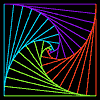
Pursuit Curve
- XLogo

Pursuit curves are formed when one object chases after another, for instance a dog after a rabbit.
In this program a number of turtles are created round the edge of a circle. Each turtle faces the turtle on it's immeadiate left. Then each one in turn steps towards its target. As the target turtle is also moving an inward spiral or pursuit curve results.
The program halts when the turtles reach the centre.
To
New
# set default screen, pen and turtle values
ResetAll SetScreenSize [400 400] HideTurtle
SetSC Black SetPC Green SetPS 1 PenUp
End
To
Init
:
N
If
:
N
<2 [Print [Need more than one turtle!] Stop]
Repeat
:
N
[
SetTurtle RepCount
Make "
Angle
RepCount*360/
:
N
SetPC
Hue
:
Angle
PenUp
Make "
Dist
190 If
:
N
=4 [Make "
Dist
260] If
:
N
=8 [Make "
Dist
200]
Left 180/
:
N
+
:
Angle
Back
:
Dist
PenDown]
End
To
Hue
:
Theta
# Output RGB hue list from angle :Theta
Make "
Red
Round 127.5*(1+Sin
:
Theta
)
Make "
Green
Round 127.5*(1+Sin (
:
Theta
+120))
Make "
Blue
Round 127.5*(1+Sin (
:
Theta
+240))
Output (List
:
Red
:
Green
:
Blue
)
End
To
Go
:
N
New
SetTurtlesMax
:
N
+1
Init
:
N
Make "
Count
0
While [(Distance [0 0]) >2] [
Repeat
:
N
[
SetTurtle RepCount Make "
myPos
Pos
If RepCount+1 >
:
N
[SetTurtle 1] [SetTurtle RepCount+1]
If
:
Count
=Integer
:
Count
[Make "
thisPos
Pos SetPos
:
myPos
SetPos
:
thisPos
]
[SetH Towards
:
myPos
Forward 2 Wait 1] ]
Make "
Count
:
Count
+0.1]
End
 Main Command:
Go 5
To run, enter go 4 , go 7 etc for increasing number of turtles.
- Animation
- Art
- Cellular Auto
- Coding
- Demo
- Dot Plot
- Fractal
- Grid
- Illusion
- L-System
- Multi Turtle
- One Line
- Perspective
- Plane Filling
- Polar
- Puzzle
- Recursion
- Sound
- Spiral
- Spirograph
- Trees
- Walks